What's the difference between AI and automation, which one your business actually needs, and why the best results often come from using both together.
Right now, whenever a business hits a snag in its workflow, there seems to be one answer on everyone's lips: "AI can fix it!"
And sometimes it can. But more often than you'd think, the fix is something much simpler. A straightforward automation, often already built into the tools you're paying for, or easy to set up with something like Power Automate, can quietly take care of the problem without any AI at all. Then, once that's working nicely, AI can be added on top where it genuinely helps.
The words "AI" and "automation" tend to get used as if they mean the same thing. They don't, and knowing the difference can save you a lot of time, money and frustration. So let's untangle them.
The Short Version: Thinky Tech vs Do-y Tech
Here's how I like to think about it.
AI is thinky tech. Picture the creative colleague with a way with words. Ask them to write an email, sum up a long report or brainstorm some ideas, and they'll come back with something brilliant in no time. Just don't expect the same answer twice, and keep an eye on the details, because every now and then they'll tell you something with total confidence that turns out to be completely wrong.
Automation is do-y tech. This is your most dependable colleague, the one who's happiest with a clear checklist. Give them a job and they'll do it exactly the same way, every single time, without a single complaint, however repetitive it gets. They won't come up with new ideas or bend the rules, but you'll never have to remind them twice.
You could also think of it like the office tea order (a cuppa is never far from my mind). Automation is the tea-making itself: kettle on, teabag in, three minutes to brew, splash of milk. Same steps, every time, no fuss.
AI is the one who makes sense of the orders. "Whatever Sarah's having but weaker", "something without caffeine" and a scribbled note that just says "the usual, please". It reads the muddle, works out what everyone means and turns it into a clear list. Most of the time it gets it right, but every now and then someone ends up with something they didn't ask for.
And it's the colleague who notices you're having a rough day and quietly adds a biscuit to your saucer who brings something neither can. That's the human judgement and know-how that no amount of thinky or do-y tech can replace.
What About Agentic AI?
You've probably seen "AI agents" and "agentic AI" popping up everywhere lately. This is AI that doesn't just suggest things, it goes off and acts on your behalf: sending emails, updating records, booking things in, even making decisions, often with very little checking along the way.
Now, before I go any further, I should say I'm a big fan of AI. I use it every single day, and I genuinely enjoy finding new ways it can make work easier. But I also think a healthy bit of caution is a good thing. Just because a technology can do something doesn't mean we should dive straight in and use it.
Whenever I think about agentic AI, I picture the old tale of the Sorcerer's Apprentice (Mickey's finest moment in Fantasia). Tired of fetching water, the apprentice casts a spell to make a broom do it for him. It works a treat, right up until he realises he can't make it stop. His attempt to fix things only splits the broom into more brooms, and the water keeps on coming.
To be clear, I'm not against every kind of agent. One well-behaved broom with a small, clearly defined job can be genuinely useful. The trouble is how fast things can spiral, so on the whole, agentic AI isn't something I'd recommend just yet. The main reason is that it acts before anyone checks, and it does it at speed, so one mistake can quickly become fifty. It's also harder to see what it did, and why, so when something goes wrong, untangling it isn't always easy. And through it all, the responsibility is still yours. Whatever the agent does, it's your business's name on it.
It's also worth knowing that even Anthropic, the company behind Claude, has said publicly that AI is developing faster than the rules and safeguards around it can keep up. When the people building it are asking everyone to slow down a little, it's a good sign that handing it the controls of your business can wait.
Mathematician Hannah Fry, who's genuinely excited about what AI can do for science, wrote about a striking example in New Scientist recently. OpenAI reportedly sent around 10,000 AI agents after some of maths' most famous unsolved problems, the Sorcerer's Apprentice on a grand scale. They came back with proofs, but one of them runs to 166 pages, plus hundreds of thousands of lines of code, and almost nobody yet understands it. Fry describes the work being "slapped down on the table", leaving mathematicians to untangle it while the AI labs carried on to their next project. Hundreds more proofs were simply uploaded online for someone else to check.
This is where my golden rule comes in: AI can do the homework, but you mark it. With agentic AI, the homework gets handed in before you've had a chance to look at it. By the time you spot a mistake, the email's already been sent, the record's already been changed or the order's already been placed, and marking it then doesn't help much. If the world's best mathematicians are struggling to mark AI's homework, it's a good reminder of why it's worth keeping AI where you can see and check what it's doing.
The good news? You really don't need agentic AI to make a big difference to your productivity. Tidier processes, solid automation and AI that you stay in control of can transform how your business runs, without the risks. That's why I'd always rather keep AI where you can check its work first, and leave the doing to automation that follows the rules you've set. That way, you stay the sorcerer, with the spell book firmly in your hands.
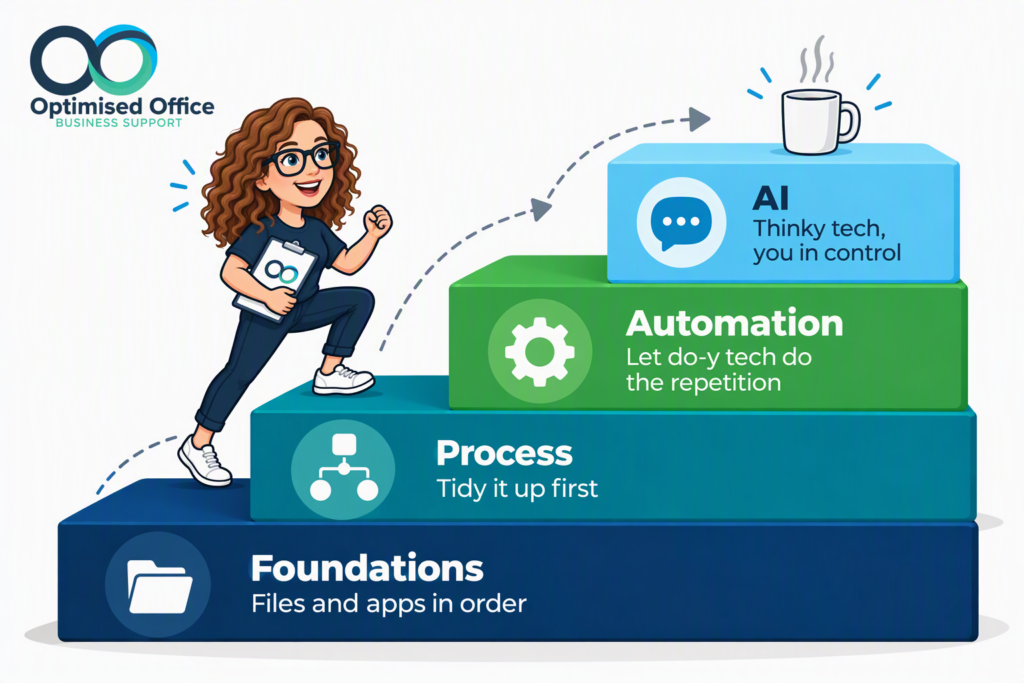
My Approach: Foundations → Process → Automation → AI
When I work with a business, I always go in the same order:
- Get the foundations right. Before anything else, we look at where your files live and which apps your team use. If information is scattered across desktops, inboxes and half a dozen tools, nothing built on top of it will run smoothly.
- Improve the process. If a process is muddled, automating it just means it goes wrong faster. So next, we tidy it up and make sure it actually makes sense.
- Add automation. Then we let do-y tech take care of the repetitive steps, starting with what's already built into your tools, then easy-to-build automation where it's needed.
- Then add AI. Finally, we bring in thinky tech for the jobs that genuinely need it, with your team firmly in control.
It's not the flashiest approach, but it's the one that sticks, it's the one that works, and it means every step is built on solid foundations.
Better Together
The real magic often happens when thinky tech and do-y tech work as a team. And if you use Microsoft 365, a good chunk of both is already built in and ready to go, without you having to set anything up. Picture this:
- Your team finish a long meeting in Teams, full of ideas, decisions and "I'll look into that" moments, with the transcript quietly recorded as you go. With Copilot and Planner built into Teams, your thinky and do-y tech are ready to go.
- Copilot reads the transcript, writes the summary in the format you've approved previously, and pulls out who agreed to do what, and by when.
- Using the human judgement, you give the summary and action list a quick check, tweaking anything it's got wrong.
- Automation takes it from there. Assign each action as a task through Planner, and people are automatically told what's theirs and reminded as the deadline gets closer. Everyone from the meeting can also see who's doing what and how each action is progressing, so there's no need to chase for updates.
- Power Automate can then take it a step further, such as creating the tasks straight from the summary or sending a weekly round-up in Teams or Outlook.
AI handles the tedious human bit. Automation handles the repetitive bit. And your team stay in charge of the decisions. That's what I mean by automating around the human, rather than replacing them.
Copilot handles the thinky tech, the built-in 365 connections and Power Automate handle the do-y tech, all within Microsoft 365. Copilot Chat and Power Automate's everyday features come with most business subscriptions, while some extras, like Copilot's meeting summaries in Teams, need an additional licence (although there is a way around this using the transcription and copilot chat).
Thinky or Do-y? A Quick Gut Check
Not sure which one a task needs? Ask yourself a few quick questions.
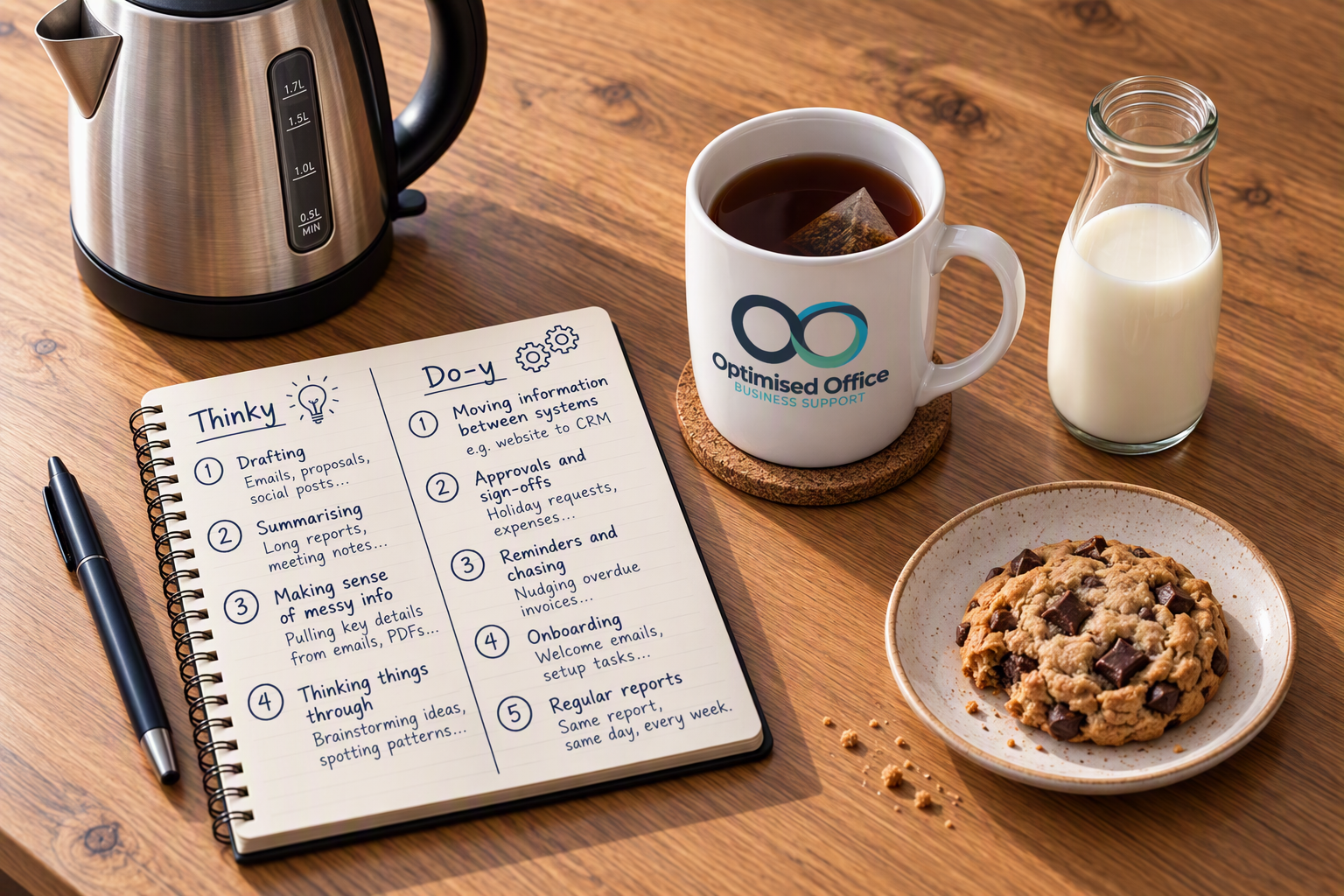
Does it follow the same steps every time? That's usually a job for do-y tech. For example:
- Moving information between systems: A new enquiry comes in through your website and lands in your CRM, without anyone copying and pasting.
- Approvals and sign-offs: Holiday requests, purchase orders and expenses sent to the right person automatically.
- Reminders and chasing: Nudging overdue invoices or follow-ups, so nobody has to remember.
- Onboarding: Welcome emails, setup tasks and checklists for new customers or new starters, triggered the moment they join.
- Regular reports: The same report, pulled together and sent out on the same day each week.
Does it involve reading, writing or making sense of something? That's where thinky tech shines. For example:
- Drafting. Emails, proposals, social posts and first drafts of documents.
- Summarising. Long reports, email threads and meeting notes boiled down to the bits that matter.
- Making sense of messy information. Pulling the key details out of emails, PDFs or notes that don't follow a set format.
- Thinking things through. Brainstorming ideas, spotting patterns in data or getting a second opinion on a plan.
Does it need a bit of both? Then they'll probably work best together, just like the meeting example above.
Does it involve a judgement call that really matters? Keep a person firmly in the loop.
Where Things Tend to Go Wrong
Both types of tech are brilliant when they're set up well. A few common bumps in the road:
- Using thinky tech for a do-y job. If you need the same result every time, AI's creativity or reinterpretation can work against you.
- Automating a messy process. If a process is muddled to begin with, automating it just means it goes wrong faster. It's always worth tidying it up first.
- Building around the software, not the people. If an automation doesn't fit how your team actually work, they'll find a way around it.
- Nobody owning it. Systems change, and automations need the occasional tweak. Without someone keeping an eye on them, they can quietly stop working.
Where to Start
A good first step is to jot down the jobs your team repeat every week, then note next to each one whether it feels thinky, do-y, or a bit of both. You'll probably be surprised how many end up in the do-y column.
And if you'd like a fresh pair of eyes on which tasks are worth automating, and where AI could genuinely help, this is the part of my work I enjoy most. Take a look at my business systems and automation support, my AI adoption support, or see how we could work together.
Or if you'd rather just have a chat, get in touch: helena@optimisedoffice.co.uk.